Home › Documentation › Onboarding checklist
Onboarding checklist
Use this list when rolling out to more than a handful of devices. It reflects what we see go wrong most often.
Before rollout
- Confirm who the account owner is and add at least one other administrator. See Users and roles.
- Turn on multi-factor authentication for all console users. It is required for administrators.
- Decide between managed keys and a customer-held passphrase. This cannot be changed for a device later without starting its backups again. See Encryption keys.
- Check the firewall against the network requirements, including TLS inspection exclusions.
- Agree retention with whoever is responsible for records management.
- Decide the schedule. Stagger servers so they do not all start at 01:00.
Pilot
- Register three to five devices of different types.
- Let each complete a full backup. Note how long it took and how much data was sent.
- Restore a file on each. For servers, restore a folder to an alternative location and compare it.
- Review skipped files in the job detail and adjust exclusions.
Rollout
- Create one enrolment key per batch or site, so that a leaked key can be revoked without affecting others.
- Deploy the agent with your software deployment tool. Silent install options are on each agent page.
- Set a bandwidth limit during working hours for the first week.
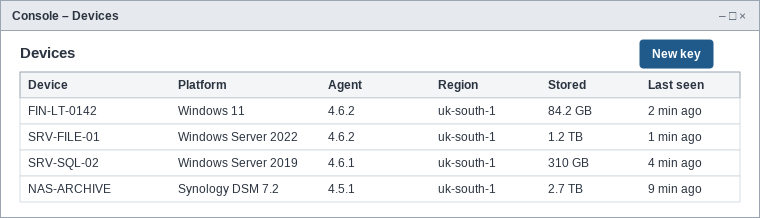
- Check the device list daily until every device has a completed backup.
After rollout
- Set up the daily summary and failure notifications to a shared mailbox, not an individual.
- Revoke enrolment keys that are no longer needed.
- Put a recurring restore test in the calendar.
- Record where the encryption passphrase is kept, if you use one, and who can access it.
- Remove any previous backup product once you are satisfied. Two backup products using VSS at the same time is a common cause of CBK-3002.