Home › Documentation › Configuration › Schedules
Schedules
Options
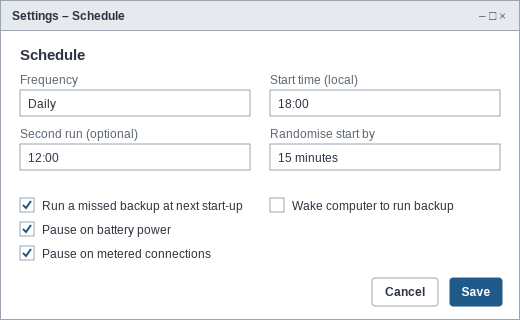
| Setting | Values | Default (workstation) | Default (server) |
|---|---|---|---|
| Frequency | Hourly, daily, weekly | Daily | Daily |
| Start time | Local time | 12:00 and 18:00 | 01:00 |
| Second run | Optional | 18:00 | None |
| Randomise start by | 0 to 120 minutes | 15 | 15 |
| Run missed backup at start-up | On or off | On | On |
| Pause on battery | On or off | On | Not applicable |
| Pause on metered connection | On or off | On | Off |
Randomised start
Each device adds a fixed random offset, chosen when it registers, of up to the configured number of minutes. This prevents every device in an office from starting at exactly the same moment. The offset stays the same from day to day.
Missed jobs
A job is missed if the device was off, asleep or without a connection at the scheduled time. If "run missed backup at start-up" is on, the agent starts a backup 10 minutes after the service next starts. A device that misses jobs for more than the period set under Notifications triggers an alert.
Time zones and daylight saving
Schedules use the device's local time. When clocks change, the job runs at the same local time. Agents before 4.3.1 ran an hour out for one day after a change; see KB-1097.
Hourly schedules
Hourly backup is intended for file servers with frequently changing data. Hourly restore points are kept for 48 hours, then thinned to daily.
Running a backup outside the schedule
From the agent window, from the console (Devices › select device › Back up now), or:
cbk backup nowBlackout windows
A policy can define periods during which no backup will start, for example during month-end processing. A job already running when a blackout begins is allowed to finish unless schedule.blackout_stops_running is true.
Application schedules
Database and hypervisor backups have their own schedules, described on the relevant agent pages.