Home › Documentation › Restores › File-level restore
File-level restore
From the agent
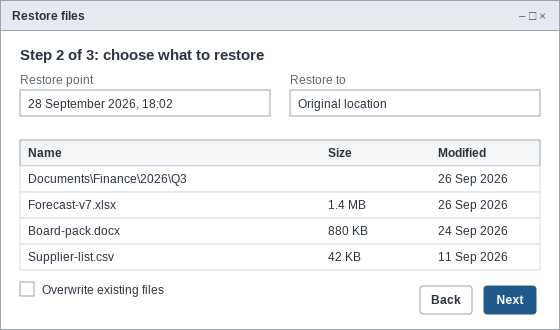
- Open the agent and choose Restore files.
- Choose a restore point. The most recent is selected by default.
- Browse to the files or folders and tick them.
- Choose where to restore to: the original location or another folder.
- Choose whether to overwrite existing files. By default, existing files are kept and the restored copy is given a suffix such as
(restored 2026-09-28).
From the console
Go to Restore › Files, choose the device and restore point, and select the files. Then choose either:
- Restore to device: the agent on the chosen device (the original or another one in the tenant) downloads and writes the files.
- Download: for selections under 5 GB, the browser downloads a ZIP file. The download link is valid for 24 hours.
Tenants using a customer-held passphrase must enter it to browse; see Encryption keys.
From the command line
cbk restore list
cbk restore files --point 2026-09-28T18:02 --path "C:\Users\j.smith\Documents\Finance" --to "D:\Restore"
Finding a file when you do not know when it was deleted
Use Search in the restore wizard or console. Enter part of the file name; results show every restore point in which a matching file exists, with its size and modified date in each.
Previous versions of a file
Select the file and choose Versions to list every distinct version held.
Mounting a restore point
On Windows and Linux a restore point can be mounted as a read-only drive or directory, which is useful for comparing folders or letting an application open files directly:
cbk restore mount --point 2026-09-28T18:02 --at R:Data is fetched on demand, so browsing is quick but reading large files is slower than a normal restore.
Permissions and timestamps
NTFS permissions, ownership, alternate data streams and timestamps are restored when restoring to an NTFS volume on Windows. POSIX ownership, mode and extended attributes are restored on Linux and macOS. When restoring across platforms only the file contents and modified time are preserved. See KB-1064.
Limits
Very large selections (more than about 2 million files) can exhaust memory on small devices. See Known issues.