Home › Documentation › Agents › Windows
Windows agent
Applies to Windows 10 (22H2) and Windows 11, x64 and ARM64. For Windows Server see Windows Server.
Install
- Download
cbk-agent-4.6.2-x64.msi(or-arm64.msi) from Devices › Add device in the console. - Run the installer as an administrator.
- Enter the enrolment key when prompted.
The agent installs to C:\Program Files\Cyphonix\Backup and stores configuration, cache and logs under C:\ProgramData\Cyphonix\Backup. It runs as the service Cyphonix Backup Agent (CbkAgent) under the Local System account.
Silent install
msiexec /i cbk-agent-4.6.2-x64.msi /qn /norestart ENROLKEY=CBK-ENR-XXXX-XXXX-XXXX DEVICENAME=%COMPUTERNAME%| Property | Meaning | Default |
|---|---|---|
ENROLKEY | Enrolment key. Required for silent install. | None |
DEVICENAME | Name shown in the console. | Computer name |
NOTRAY | Set to 1 to hide the notification area icon. | 0 |
PROXYURL | Proxy, for example http://proxy:3128. | System proxy |
INSTALLDIR | Installation folder. | C:\Program Files\Cyphonix\Backup |
The installer returns 0 on success, 3010 if a restart is needed to replace files in use (rare), and 1603 on failure. The install log is written to %TEMP%\cbk-install.log.
The agent window
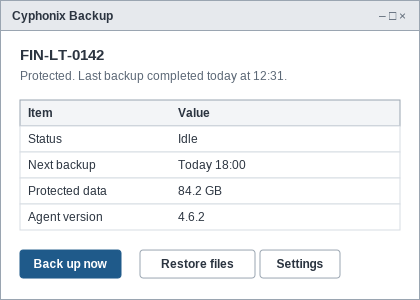
Users can start a backup, restore their own files and see status. Whether users can change settings is controlled by policy. With NOTRAY=1 the agent has no user interface and is managed from the console only.
What is backed up by default
The workstation default policy includes C:\Users and excludes temporary files, browser caches and cloud-sync placeholder files. See Exclusions and KB-1038.
Laptops
- Backups pause on battery power by default; see KB-1027.
- Backups pause on connections Windows marks as metered.
- A backup missed because the laptop was asleep runs at next start-up.
Uninstall
Use Settings › Apps, or:
msiexec /x cbk-agent-4.6.2-x64.msi /qnUninstalling does not delete the device's restore points. Configuration and cache under ProgramData are left in place; delete the folder if the device will not be re-registered.